One custom cursor is a feature. Five cursors across three projects is a maintenance problem — unless they live in a proper cursor library. This guide shows how to organise effects so they stay consistent, performant and easy to drop into the next project.
Why a cursor library beats copy and paste
Copying an effect from a gallery into a project is the right first step. The trouble starts on the second project. You copy the effect again, tweak the colours, fix a bug you noticed, and now two versions exist. By the fourth project nobody remembers which copy contains the reduced-motion check or the touch-device guard.
A cursor library solves that by putting every effect in one place with a shared contract. Each effect accepts the same kind of configuration, cleans up the same way, and is documented in the same format. Projects import from the library rather than keeping private copies. The Cursor Custom package is already organised along these lines, which makes it a natural foundation: 24 effects, a central data file describing their parameters, and consistent component structure.
Start with a clear folder structure
Here is a layout that scales from a handful of effects to dozens:
cursor-library/
├─ src/
│  ├─ core/
│  │  ├─ useAnimationFrame.js
│  │  ├─ usePointer.js
│  │  ├─ canMotion.js
│  │  └─ dpr.js
│  ├─ effects/
│  │  ├─ trails/
│  │  │  ├─ ParticleTrail.jsx
│  │  │  └─ RainbowComet.jsx
│  │  ├─ rings/
│  │  │  ├─ ElasticRing.jsx
│  │  │  └─ NeonGlow.jsx
│  │  └─ fields/
│  │     ├─ Magnetic.jsx
│  │     └─ Constellation.jsx
│  ├─ presets/
│  │  └─ brand.js
│  └─ index.js
├─ docs/
└─ package.json
Three ideas carry this structure:
- Core helpers hold behaviour every effect needs: an animation-frame hook with guaranteed cleanup, a pointer tracker, a motion-permission check and a device-pixel-ratio helper. Fix a bug here and every effect benefits.
- Effects are grouped by behaviour, not by technology. A designer looking for “something that trails” should not need to know whether it uses canvas or CSS.
- Presets store brand values — colours, sizes, stiffness — separately from effect code.
Categorise effects by motion, weight and context
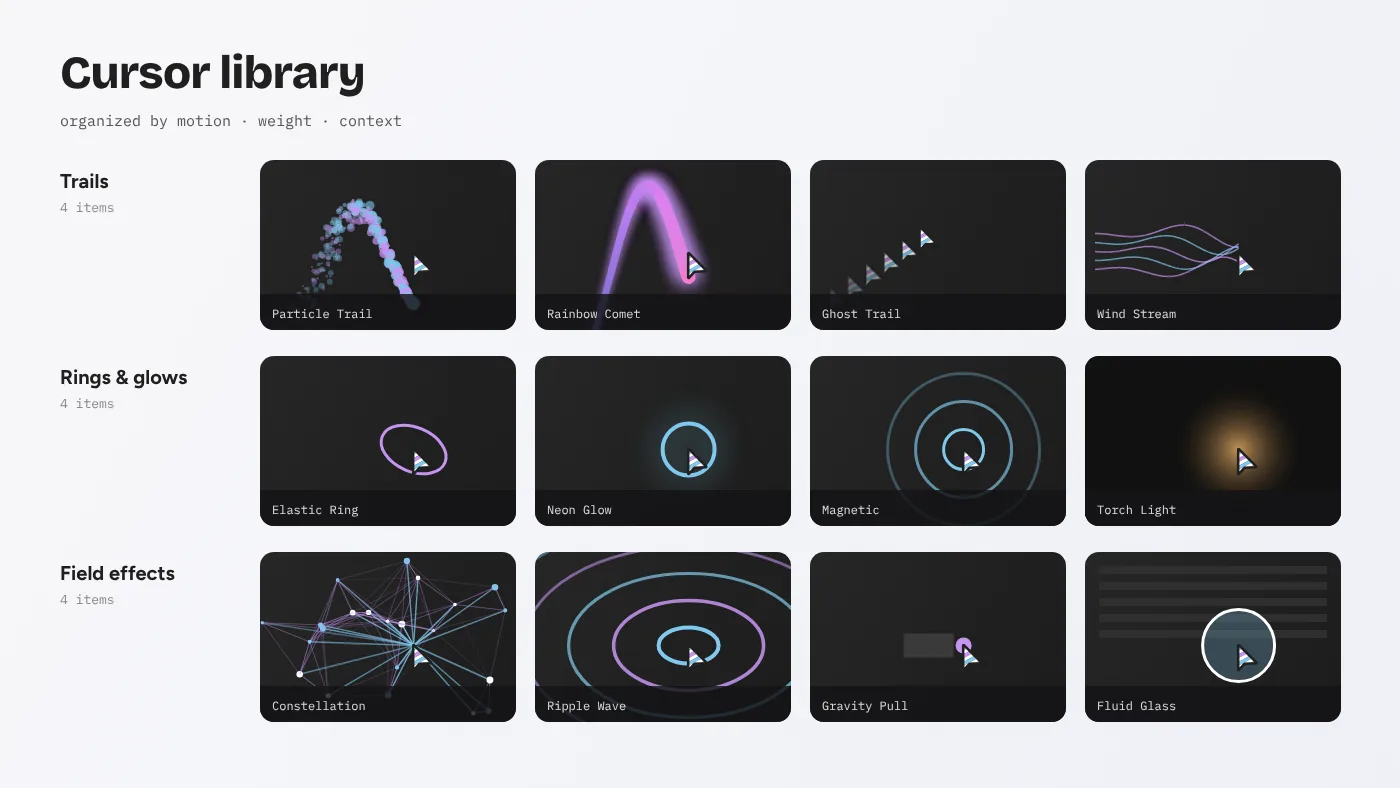
Good libraries answer “which cursor should I use here?” quickly. We sort effects along three axes.
Motion type
| Category | Examples from the gallery | Character |
|---|---|---|
| Trails | Particle Trail, Rainbow Comet, Ghost Trail, Wind Stream, Fire Trail | Leave a history of movement behind |
| Rings and glows | Elastic Ring, Neon Glow, Torch Light, Spotlight | Wrap or light the pointer itself |
| Field effects | Magnetic, Gravity Pull, Constellation, Ripple Wave | Change the page around the pointer |
| Transformations | Glitch Shift, Mirror Ghost, Difference Blend, Fluid Glass | Alter how content is displayed |
Weight
Label every effect light, medium or heavy based on measured frame cost, not guesswork. Record the average scripting and rendering time per frame in Chrome DevTools at 4× CPU throttling. CSS effects like Difference Blend are typically light. Canvas particle systems are medium or heavy depending on count.
Context
Note where each effect has been used successfully: hero sections, portfolios, product pages, education. This turns the library into institutional memory, so the next designer can see that Magnetic worked well on a single call-to-action but felt chaotic across a whole navigation bar.
Define one configuration contract
Every effect in the library should accept a single config object with documented defaults. The Cursor Custom gallery already does this: each slide passes a reactive config into its effect, and the sidebar sliders edit that object live. Keep the same pattern in your library:
export function ElasticRing({ config = {} }) {
  const cfg = { size: 34, stiffness: 0.18, damping: 0.74,
                color: 'var(--cursor-accent)', ...config };
  // ...
}
Use the same key names across effects wherever meaning overlaps. If one effect calls it color and another calls it tint, people will pass the wrong prop. A short naming table in the docs prevents drift:
size— base diameter in CSS pixels.color/colors— single or multiple colours, preferably CSS custom properties.count— particle or node count.stiffness,damping— spring physics, 0 to 1.speed— follow or lerp speed, 0 to 1.
Bake accessibility and performance into the core
A library is the best place to enforce rules nobody should have to remember. Put them in core helpers so every effect inherits them:
- Motion permission. A
canMotion()helper returns false whenprefers-reduced-motion: reducematches or the pointer is coarse. Effects call it before starting. - Frame loop with cleanup.
useAnimationFramestarts a loop and always cancels it on unmount. Effects never callrequestAnimationFramedirectly. - Scoped canvases. Canvas effects size themselves to their container, as the gallery’s preview areas do, instead of covering the full viewport by default.
- Visibility pause. An
IntersectionObserverpauses loops for effects scrolled out of view. - Pointer restore. If an effect hides the native cursor, the core restores it over
a,button,inputand[role=button].
Document each effect the same way
Each effect gets a short page or Markdown file with the same sections:
- Summary — one sentence describing the behaviour.
- Preview — a short screen recording or still image.
- Config — every key, type, default and sensible range.
- Weight — measured cost and the test machine.
- Do and don’t — where it works and where it does not.
- Source — attribution and license.
That last point matters. Effects derived from the CursorX package carry the MIT license. Keep the original copyright notice in the library’s license file and mention it in each effect’s source section. It costs nothing and keeps your library clean if it is ever audited.
Keep a live gallery
Documentation alone is not enough for something as tactile as a cursor. People need to move a mouse and feel it. The easiest approach is to keep the CursorX gallery pattern: a page per effect, an isolated preview area and a tuning panel. You can extend the original gallery by adding your own effects to its data file, or build a smaller internal version. Either way, the gallery doubles as a test bench when you change core helpers.
Version and release deliberately
Treat the library like any dependency:
- Use semantic versioning. Renaming a config key is a breaking change.
- Keep a changelog that names the affected effects.
- Publish to a private npm registry or a Git tag that projects pin to.
- Upgrade projects intentionally rather than tracking the latest commit.
Small teams can skip the registry and use a Git submodule or a workspace package in a monorepo. The important part is that projects import a known version rather than pasting files.
Testing that actually catches cursor bugs
Cursor effects fail in ways unit tests rarely notice. Focus on three checks:
- Mount and unmount loops. Mount and unmount each effect 50 times in a test page and confirm no canvases or listeners remain. Leaks show up as duplicate cursors.
- Frame budget. A scripted pointer path through each effect, recorded with the Performance API, warns if average frame time exceeds your threshold.
- Visual snapshots. Static screenshots at a fixed pointer position catch accidental colour or size changes from preset edits.
Common mistakes when building a cursor library
- One global cursor for everything. Mounting a heavy effect in the root layout means every page pays its cost. Libraries should make scoped mounting the default.
- Hard-coded colours. Writing hex values inside effects makes rebranding painful. Read colours from CSS custom properties or a preset file.
- No owner. A library without a maintainer drifts. Name one person who reviews changes to core helpers.
- Skipping touch devices. Every effect needs a defined behaviour on coarse pointers, even if that behaviour is “do nothing”.
- Undocumented physics. Values like stiffness and damping only make sense with a recorded range. Note what feels too loose and too tight.
Avoiding these five problems does more for long-term quality than adding new effects ever will.
Example: turning three gallery effects into a library
Here is how a small studio might start. They pick Elastic Ring for everyday navigation, Particle Trail for hero sections and Ripple Wave for click feedback on interactive demos. Each component is copied from the gallery into src/effects/, and every direct call to requestAnimationFrame is replaced with the shared useAnimationFrame hook. Hard-coded colours become references to --cursor-accent and --cursor-trail, defined once in the brand preset. Each effect receives a docs page with its config table and measured weight: Elastic Ring light, Ripple Wave light, Particle Trail medium at 180 particles. Finally, a tiny internal gallery page mounts all three with sliders, so designers can try new values without asking a developer.
The whole conversion takes an afternoon. From then on, a new project imports three tested effects instead of reinventing them, and a bug fix in the shared hook reaches every project at the next version bump.
A sensible first version
You do not need everything above on day one. A useful starting library is:
- Three effects your team actually uses, taken from the gallery.
- The core frame-loop and motion-permission helpers.
- One brand preset file.
- A README with the config naming table.
Grow it as projects ask for more. The 24 effects in the Cursor Custom package give you a deep pool to draw from, and because they already share a configuration pattern, moving them into a structured library takes hours, not weeks.
Before adding heavy effects, read the performance optimisation guide and set a frame budget for the whole library.